

Mollie has no affiliate feature for the products you sell through it, so your own affiliate program on Mollie runs in affiliate software, and as of September 2026 it runs natively with Rekomi. You paste one advanced access token, Rekomi creates the webhook in your Mollie organization for you, and from then on every payment, renewal, refund and chargeback credits or debits the right affiliate on its own. This article covers how Mollie affiliate tracking actually works, what happens with subscriptions, refunds and coupon codes, and the steps a brand on Mollie does, in order.
The whole setup on one screen
Here’s what an affiliate program on Mollie looks like end to end.
- What you get: affiliates apply, you approve them, each one gets a link, you set the commission once, and Rekomi runs the payouts and collects the tax forms.
- What you install: the Rekomi script on your own site and one advanced access token from Mollie, pasted into Rekomi.
- How a sale gets credited: the affiliate’s link sets a first-party cookie on your site, your backend stamps that referral into the payment’s metadata as
rekomi_ref, and Rekomi credits the affiliate when Mollie’s signedpayment.paidevent arrives. - What counts: any payment that reaches paid, one-time or recurring, recorded once in any of Mollie’s 28 currencies.
- What reverses: a refund claws back its own amount once Mollie marks it refunded, and a chargeback claws back when Mollie receives it, never past what was credited.
- Who pays the affiliates: Rekomi does, on real payout methods, with approval and anti-fraud checks before anything moves.
- What it costs: a Rekomi plan at $29, $49 or $99 a month after a 14-day free trial, plus 3% of the affiliate payouts.
- How long it takes: about two minutes on the Mollie side, plus one metadata line wherever your backend creates payments.
How Mollie affiliate tracking works
Mollie hosts its checkout on its own domain and runs no scripts there, and that one fact shapes the whole design (it’s genuinely the only tricky part). So, where does the tracking happen? In two places, the click on your site and the paid event from Mollie. Here’s how it works:
The click. The Rekomi script sits on your own pages, stores the referral from an affiliate’s link in a first-party cookie on your domain, and window.Rekomi.getReferral() hands it to your code whenever you need it.
The stamp. When your backend creates the payment, it sets metadata.rekomi_ref to that referral. That one key is the whole attribution carrier, and Mollie sends it back inside the event, so the sale arrives already labeled.
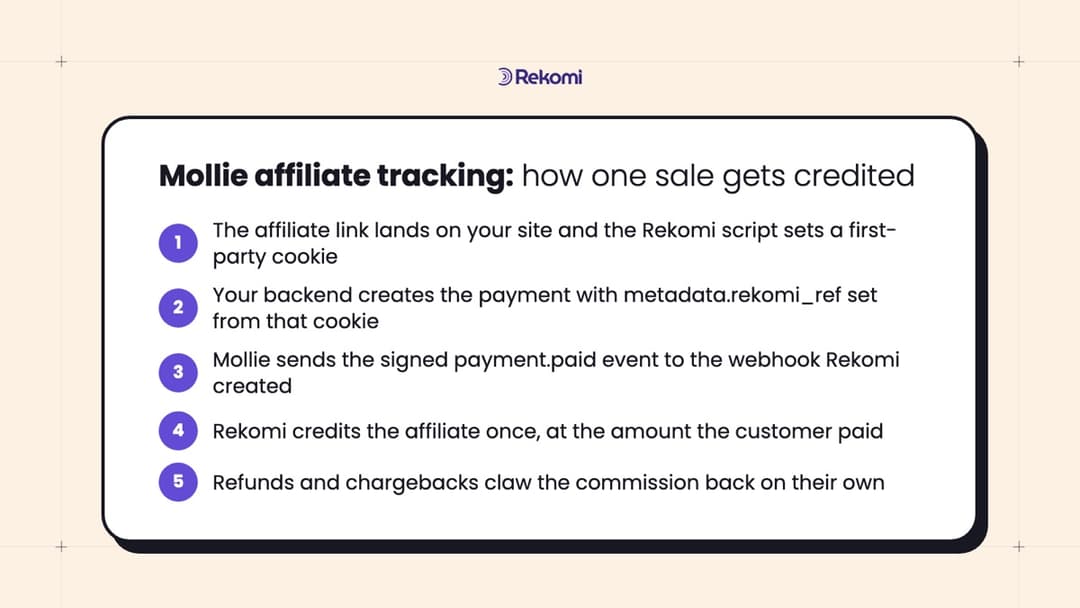
The paid event. This is the part I genuinely enjoy. Rekomi creates one signed webhook in your Mollie organization at connect time, so there’s no relay code to write, and Mollie sends the full payment to it the moment a payment reaches paid. Rekomi checks the signature, drops anything unsigned, and records one conversion per payment id. Mollie retries a delivery up to ten times over 26 hours, and Rekomi also looks for new payments every 30 minutes, so a sale is never missed and literally never counted twice.
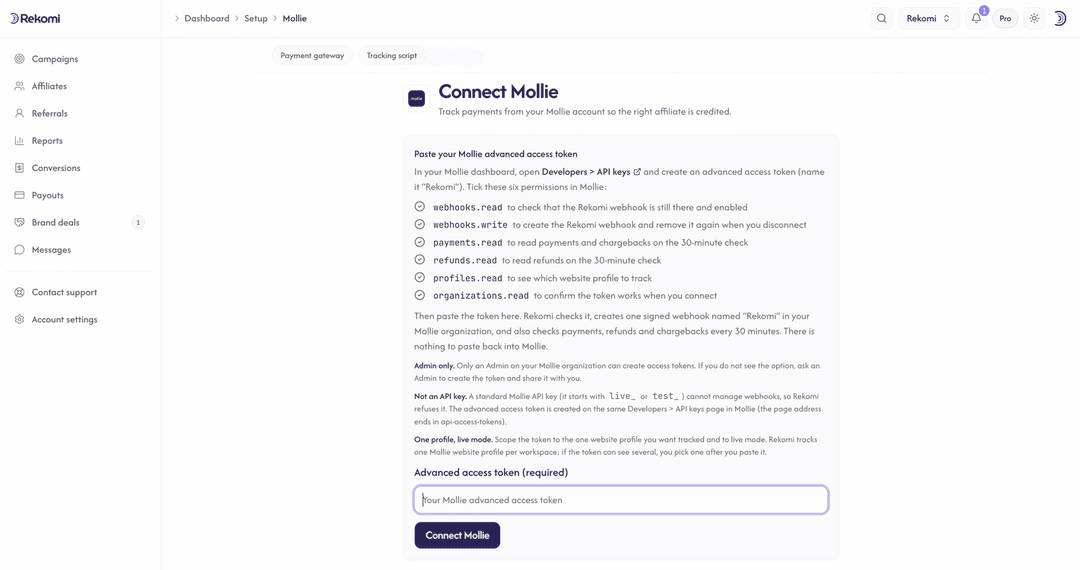
The token. It’s an advanced access token, not a standard API key, because a standard key can’t manage webhooks. The advanced token holds seven permissions (webhooks.read, webhooks.write, payments.read, refunds.read, profiles.read, organizations.read and customers.read), and none of them can move money, so Rekomi never holds more of your Mollie account than it needs.
If customers sign up first and get charged days later (a no-card trial, say), there’s no browser around at charge time. Turn on the script’s email capture on your signup form with data-rkmi-email-capture="auto" on the loader tag, pass the buyer’s email as billingAddress.email on the payment, and Rekomi matches it to a lead captured in the last 90 days. With that email capture on your signup form, subscription sales attribute even without the metadata stamp, because Rekomi reads the customer’s email from Mollie for subscription payments (that’s what customers.read is for) and matches it to the lead. If you connected Mollie before customers.read was on that list, your token doesn’t carry it, so create a fresh advanced access token with all seven permissions and reconnect (your history is preserved), and pass billingAddress.email on the payments you create yourself until then. The stamp stays the precise path, so keep it wherever your backend can set it.
Subscriptions and renewals
Renewals are where a lot of tracking setups fall apart, and Mollie makes this one super easy. Any metadata you set on a subscription gets forwarded by Mollie to every payment it generates, so you stamp rekomi_ref once and every renewal arrives already carrying it. Stamp the first payment too, the one with sequenceType: "first" that sets up the mandate, because Mollie creates it separately.
Mollie also labels every payment as oneoff, first or recurring, so Rekomi never has to guess which charge is the renewal, and your recurring commission rules (a cap, a delay, a churn window, etc.) key off that label. The 0.00 or 0.01 EUR mandate check is never a sale, and a failed renewal costs nothing because only the retry that ends paid records. Recurring commission for the life of the customer, with no lifecycle code to write!
Refunds, chargebacks and VAT
Refunds reverse commission automatically, per refund. Each one claws back its own amount once it reaches Mollie’s refunded status, so a partial refund claws back only the refunded share, never past the original commission. Chargebacks claw back when Mollie receives them; a later reversal is logged rather than restored automatically, so the decision stays yours.
Mollie offers refund and chargeback events as a beta on some accounts; where they aren’t granted yet, the 30-minute check claws back the same way, up to half an hour later instead of a few seconds.
On VAT: Mollie is a payment service provider, not a merchant of record, so a payment carries what the customer paid, VAT included. When you send order lines with VAT amounts, Rekomi computes commission on the pre-tax total, so affiliates earn on the sale and not on the tax; with no lines, it uses the charge amount.
Coupon codes on Mollie
Mollie has no coupon or discount-code object in its API, and its hosted checkout has no code field. So, if you want per-affiliate codes, your own checkout collects the code and your backend passes it as metadata.rekomi_coupon on the same call that creates the payment. A coupon stamp outranks the referral stamp when both are present, because the code is the more deliberate signal. Rekomi reads the coupon on one-time and first payments only, so a coupon’s commission override applies to the first charge; renewals credit the same affiliate through customer history.
If you sell through WooCommerce, Shopify or Wix with Mollie as the payment method underneath, connect the shop’s own Rekomi integration instead, because the shop is where the order and the coupon live.
What a brand on Mollie does, step by step
I went back and forth on how much of the setup guide to repeat here and landed on the short version, because steps 1 and 2 really are the entire Mollie side.
- Create the token in Mollie. Have an Admin user open Developers > API keys, create an advanced access token named “Rekomi”, and tick the seven permissions above. Create it for live mode and for all website profiles in your organization, not just the one you want tracked. Mollie doesn’t document this, but a token limited to a single profile gets a 403 when Rekomi connects. You pick the profile to track in Rekomi after pasting.
- Connect in Rekomi. Paste the token on the Mollie setup page and click Connect Mollie. Rekomi validates it live, creates the webhook named “Rekomi” in your organization and stores the signing secret encrypted. That’s the whole Mollie side done!
- Install the script on your site. It’s the same script every Rekomi install uses, on your pricing, signup and thank-you pages, not on Mollie.
- Stamp the referral. Wherever your backend creates a payment or a subscription, add
metadata.rekomi_reffromwindow.Rekomi.getReferral(), plusmetadata.rekomi_couponif you take codes andbillingAddress.emailfor signup-first flows. - Create the campaign and invite affiliates. Set the commission, a percentage or a fixed amount, one-time or recurring, and share the apply link. Rekomi runs the payouts, so this is the last piece you own.
- Test it with one real purchase. Click Check connection on the setup page (it verifies the token and the webhook and asks Mollie for a test event), then buy once through your own affiliate link, watch the conversion land on the campaign’s Performance tab within a minute, refund it, and watch the commission claw back.
Mollie’s test mode is EUR only and isolated from live, so that one real purchase and refund is the honest rehearsal. The Mollie integration page has the pricing and feature list, and the Install on Mollie guide has every field, permission and troubleshooting step.
The questions that come up
Does Mollie have an affiliate feature for the products I sell?
No. Mollie processes the payment and has no affiliate manager, coupon codes or partner links for your products, so your own program on Mollie runs in affiliate tracking software, with the Mollie connection feeding it the paid events.
Does this work with Mollie Components or a custom checkout?
Yes. Any setup where your own backend creates the payment through Mollie’s API works: the hosted checkout, Mollie Components, which keep the card form on your own domain, and the Subscriptions API.
Do this next
If you’ve been putting off an affiliate program because the tracking looked like a project, it’s a token and a metadata key now. Create the advanced access token, paste it into Rekomi, and buy one product through your own affiliate link. When that sale shows up credited, you’re live, and the first affiliate you invite earns on their very first sale!
Open dashboard Start a 14-day free trial View pricing

