

Broadcasts
Send a single email to all (or filtered) affiliates. Plan limits and unsubscribe semantics.
A broadcast is a single email you send to the affiliates in your organization. Use it for product updates, new asset drops, promo announcements, or asking creators to push a fresh campaign.
Where to send broadcasts
The composer lives on the campaign's Emails tab, under Broadcasts.
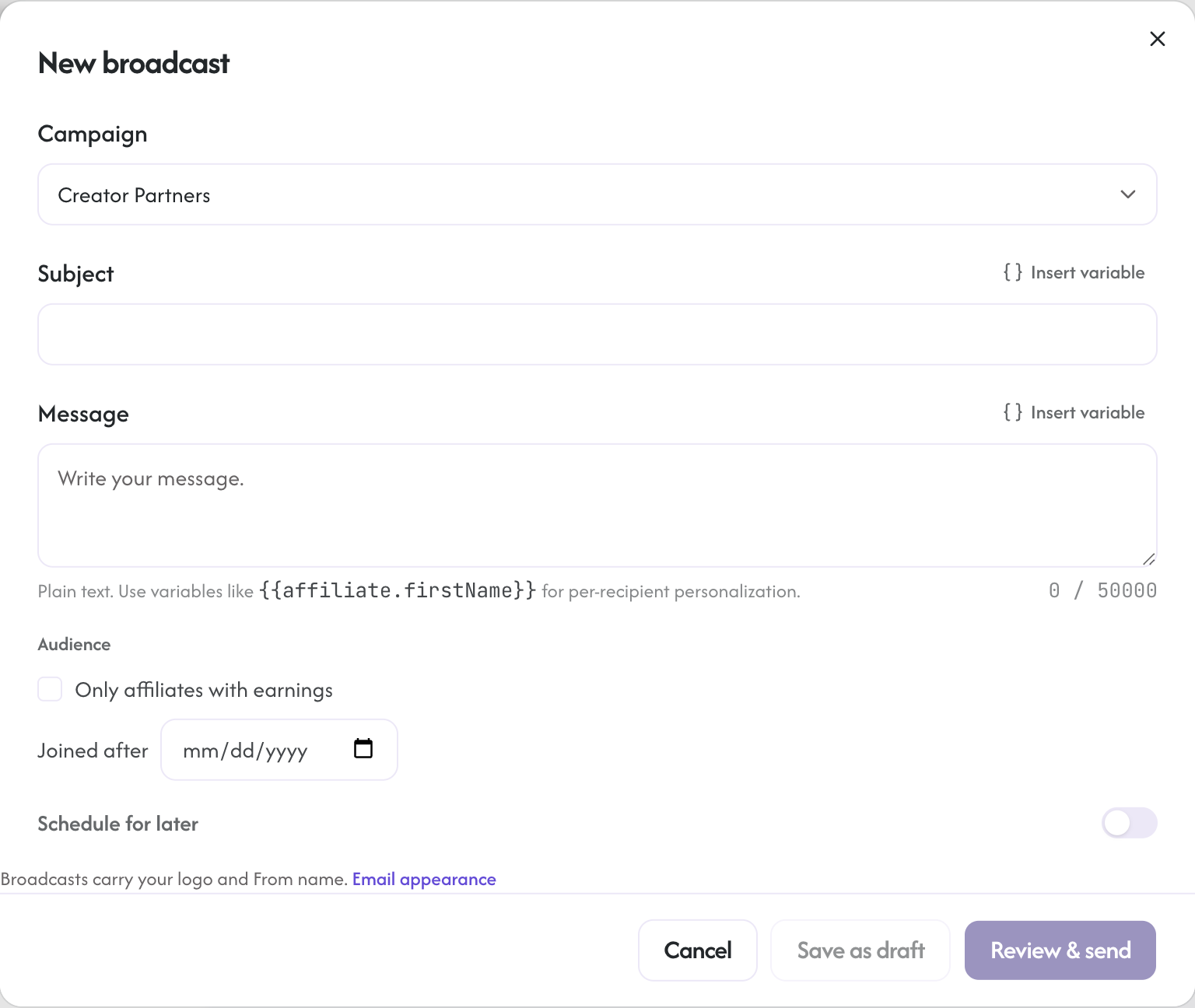
Form fields:
- Subject: 1-200 chars. No newlines or control characters (server-side validated against header injection).
- Message: 1 to 50,000 chars. Plain text.
- Campaign (optional): scope the broadcast to one campaign's affiliates. Leave blank for all affiliates in the org.
Personalize with variables like {{affiliate.firstName}}, {{affiliate.link}} (the same share link the affiliate copies from their dashboard) and {{affiliate.code}} (their active coupon code on the campaign) via the "Insert variable" menu on both the Subject and Message fields; each recipient sees their own values. Square brackets such as [LINK] are not variables and go out exactly as typed. Line breaks are kept, and lines that start with - render as a bulleted list.
Daily allowance and the overflow drip
Every plan includes a number of bulk emails a day: 100 on Starter, 500 on Growth, 2,000 on Pro, and no limit on Enterprise. Accounts on trial, past due, or younger than 14 days send up to 100 a day. Transactional email (approvals, login codes, payout and tax notices) is never counted.
A broadcast larger than what is left for today is not refused. Today's remaining allowance goes out now and the rest follows at your daily rate, in batches starting at 14:00 UTC on the following days, and the composer tells you the schedule before you send. The broadcasts list shows how many are still queued and when the next batch goes. Need more on a given day, for a launch or a time-sensitive announcement? Email support@rekomi.com and we can raise the allowance temporarily.
Click "Review & send". The confirm step shows the recipient count before anything goes out: how many approved affiliates will receive it and how many unsubscribed addresses will be skipped. Click "Confirm send" to send.
Addresses Rekomi skips
Before each broadcast, affiliate invite or claim reminder goes out, Rekomi checks the recipient address. Addresses that do not exist, disposable addresses, spam traps, mailboxes with a history of marking mail as spam and marketplace relay addresses (order relay mailboxes that come in with a store import, such as bounce-1234-seller@mail.codisto.com) are skipped. Broadcasts and claim reminders also skip mailboxes with recent abuse reports or a very high fraud score. A skipped address is never handed to the email provider and never counts against your daily allowance, which protects your delivery rate and your sender reputation.
Skipped addresses show on the Broadcasts tab under "addresses skipped", with the reason, and each broadcast shows a Skipped count next to Sent. The affiliates stay in your list; nothing else changes for them. If the check itself is unavailable for a moment, the email is sent as normal.
What recipients see
Each affiliate receives an email from notifications@mail.rekomi.com (brands with a verified custom sending domain send from their own domain instead; see Sending email) with:
- Your subject line
- Your body
- A
List-Unsubscribeheader (RFC 8058 one-click unsubscribe compliant) - A
Reply-To: support@rekomi.comheader (configurable) - The standard Rekomi-branded HTML wrapper
The List-Unsubscribe header means Gmail and Yahoo show a one-click "Unsubscribe" button. Clicking it adds the recipient to the global suppression list. They will not receive broadcasts from any organization on Rekomi going forward. Transactional emails (payouts, application status) still arrive.
Suppression list
Three things land an affiliate on the suppression list:
- They clicked List-Unsubscribe.
- Their email hard-bounced (typo, full inbox, mail server rejected).
- They marked an earlier broadcast as spam.
Suppressed recipients are removed before the send, so the recipient count you see already reflects only deliverable addresses. The suppression list is global across organizations (we don't want different orgs spamming users who clearly want out).
Plan limits
Per-tier broadcast quotas (monthly, per recipient cap per broadcast):
| Tier | Monthly emails (total recipient sends) | Max recipients per broadcast |
|---|---|---|
| Starter | 1,000 | 100 |
| Growth | 10,000 | 1,000 |
| Pro | 50,000 | 10,000 |
| Enterprise | unlimited | unlimited |
The composer enforces both limits at send time. If you exceed your monthly cap, the next broadcast is blocked with an HTTP 402 response and an inline error.
Suspended broadcasts
If your organization's rate of bounces plus spam complaints exceeds 5 percent over a 24 hour window (minimum 20 sends), broadcast sending is automatically suspended; the next send attempt returns an error explaining why. Resuming requires contacting support. This protects domain reputation for everyone on mail.rekomi.com.
Rate limiting
Broadcast endpoint is rate-limited per user (10 sends per minute). The idempotency-key header (optional) allows safe retries if your dashboard tab loses connection mid-send; the same (orgId, idempotencyKey) returns the prior result within a 60-minute window.
Future: HTML compose, scheduled sends, segments
Three features on the deferred list:
- HTML composer with a WYSIWYG editor (today: plain text only)
- Scheduled sends (today: send-now only)
- Segment filters (e.g., "all affiliates who drove a sale in the last 30 days"; today: filter by campaign only)
Emails
The automated email catalog on each campaign, campaign-scoped switches, previews, and where broadcasts live.
CRM and email integrations
Rekomi integrates with 39 email and CRM platforms. Approved affiliates auto-sync to your existing audience with the right tags and the right consent, and on beehiiv, Kit, MailerLite, Ontraport and GoHighLevel the same connection also credits sales to the affiliate whose link brought the customer.